API Reference
API Reference

Authentication

Overview

Subotiz OpenAPI uses ​​API Signature​​ for request authentication. When accessing the OpenAPI, you must generate a signature for the request content using a specified algorithm and include the signature value in the request headers. Subotiz will verify this signature value to confirm the legitimacy of the request.

Digital Signature

Prerequisites

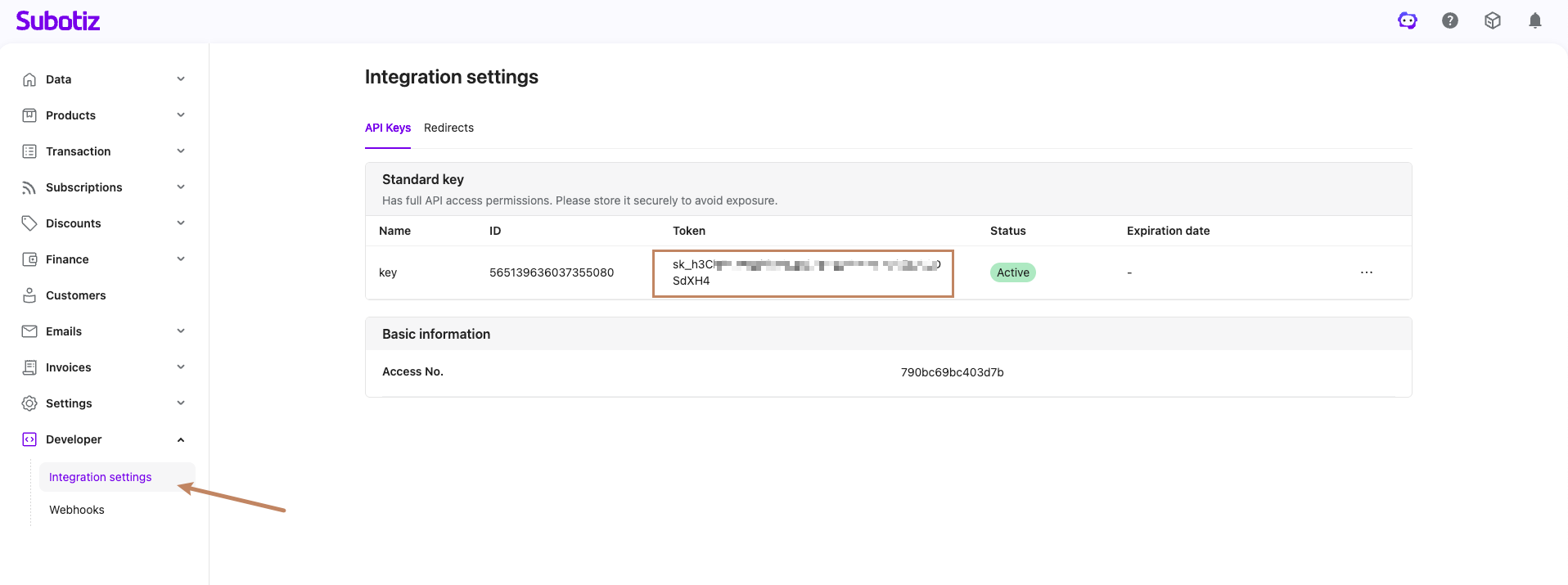
You must first obtain the API authentication secret key, access_secret, from the Subotiz merchant platform. This key serves as the core credential for the HMAC-SHA256 signature algorithm and must be kept strictly confidential.

​​Query Key Information:​​

​​Construct the Signature String​​

The signature string consists of four lines, each representing a parameter. It ends with a newline string \n(ASCII code 0x0A), including after the last line. If a parameter itself ends with \n, an additional \n must still be appended.

Line 1: "HTTP Request Method\n"
Line 2: "URL\n"
Line 3: "Request Timestamp\n"
Line 4: "Request Body\n"

Step 1: Obtain the HTTP Request Method

Extract the HTTP method of the request (e.g., GET, POST, PUT, etc.) to form the first line of the signature string. Example:

"GET\n"

Step 2: Process the Request URL

Obtain the absolute URL of the request (e.g., https://xxx.com/api/v1/payment/query?out_trans_id=2024123232323). ​​Remove the protocol and domain parts​​ (i.e., keep only the path and query parameters) to form the URL used for signing. If query parameters are present, include the ? and the subsequent query string. Example:

/api/v1/payment/query?out_trans_id=2024123232323\n

Step 3: Extract the Request Payload Body

Obtain the content of the Request Body based on the request method type:

  • ​​GET Requests​​: No request body; use an empty string "" followed by a newline \n.
  • ​​POST/PUT Requests​​: Use the actual JSON-formatted request body content sent (must be identical to the content sent).

Step 4: Concatenate the Complete Signature String

Obtain the current timestamp in milliseconds. Combine the four parts according to the rules above to form the complete signature string. Example (GET request):

"GET\n/api/v1/payment/query?out_trans_id=2024123232323\n1754562236502\n\n"

Raw string print example:

GET
/api/v1/payment/query?out_trans_id=2024123232323
1754562236502
             

Signature Value Calculation

Use the HMAC-SHA256 algorithm with the access_secret as the key to hash the signature string, generating the final signature string (signature).

GO Code Example

// Calculate Signature
func CalcSignature(secret string) string {
    str := "GET\n/api/v1/payment/query?out_trans_id=2024123232323\n1754562236502\n\n"         
    // Create HMAC-SHA256 hasher         
    mac := hmac.New(sha256.New, []byte(secret))         
    // Write the data to be signed         
    mac.Write([]byte(str))
    return hex.EncodeToString(mac.Sum(nil))
}
package org.example;

import javax.crypto.Mac;
import javax.crypto.spec.SecretKeySpec;
import java.nio.charset.StandardCharsets;

public class Main {
    public static String generateSHA256(String signatureParams, String secret) {
        try {
            Mac sha256HMAC = Mac.getInstance("HmacSHA256");
            SecretKeySpec secretKeySpec = new SecretKeySpec(secret.getBytes(StandardCharsets.UTF_8), "HmacSHA256");
            sha256HMAC.init(secretKeySpec);

            sha256HMAC.update(signatureParams.getBytes(StandardCharsets.UTF_8));

            byte[] hashBytes = sha256HMAC.doFinal();

            StringBuilder sb = new StringBuilder();
            for (byte hashByte : hashBytes) {
                sb.append(String.format("%02x", hashByte & 0xff));
            }

            return sb.toString();
        } catch (Exception e) {
            throw new RuntimeException("failed to generate signature result", e);
        }
    }
}
import hmac
import hashlib


def calc_signature(secret: str, signature_string: str) -> str:
    """
    计算 HMAC-SHA256 签名

    Args:
        secret: 密钥
        signature_string: 待签名字符串

    Returns:
        十六进制签名字符串
    """
    mac = hmac.new(
        key=secret.encode('utf-8'),
        msg=signature_string.encode('utf-8'),
        digestmod=hashlib.sha256
    )
    return mac.hexdigest()


if __name__ == "__main__":
    # 测试用例
    secret = "test_secret_key"
    signature_string = "GET\n/api/v1/payment/query?out_trans_id=2024123232323\n1754562236502\n\n"

    result = calc_signature(secret, signature_string)
    print(f"Python Signature: {result}")
<?php

/**
 * 计算 HMAC-SHA256 签名
 *
 * @param string $secret 密钥
 * @param string $signatureString 待签名字符串
 * @return string 十六进制签名字符串
 */
function calcSignature(string $secret, string $signatureString): string
{
    return hash_hmac('sha256', $signatureString, $secret);
}

// 测试用例
if (php_sapi_name() === 'cli' && basename(__FILE__) === basename($argv[0] ?? '')) {
    $secret = 'test_secret_key';
    $signatureString = "GET\n/api/v1/payment/query?out_trans_id=2024123232323\n1754562236502\n\n";

    $result = calcSignature($secret, $signatureString);
    echo "PHP Signature: " . $result . "\n";
}
require 'openssl'

# 计算 HMAC-SHA256 签名
#
# @param secret [String] 密钥
# @param signature_string [String] 待签名字符串
# @return [String] 十六进制签名字符串
def calc_signature(secret, signature_string)
  digest = OpenSSL::Digest.new('sha256')
  hmac = OpenSSL::HMAC.hexdigest(digest, secret, signature_string)
  hmac
end

# 测试用例
if __FILE__ == $PROGRAM_NAME
  secret = 'test_secret_key'
  signature_string = "GET\n/api/v1/payment/query?out_trans_id=2024123232323\n1754562236502\n\n"

  result = calc_signature(secret, signature_string)
  puts "Ruby Signature: #{result}"
end
// 需要在 Cargo.toml 中添加依赖:
// [dependencies]
// hmac = "0.12"
// sha2 = "0.10"
// hex = "0.4"

use hmac::{Hmac, Mac};
use sha2::Sha256;

type HmacSha256 = Hmac<Sha256>;

/// 计算 HMAC-SHA256 签名
///
/// # Arguments
/// * `secret` - 密钥
/// * `signature_string` - 待签名字符串
///
/// # Returns
/// 十六进制签名字符串
fn calc_signature(secret: &str, signature_string: &str) -> String {
    let mut mac = HmacSha256::new_from_slice(secret.as_bytes())
        .expect("HMAC can take key of any size");
    mac.update(signature_string.as_bytes());
    let result = mac.finalize();
    hex::encode(result.into_bytes())
}

fn main() {
    // 测试用例
    let secret = "test_secret_key";
    let signature_string = "GET\n/api/v1/payment/query?out_trans_id=2024123232323\n1754562236502\n\n";

    let result = calc_signature(secret, signature_string);
    println!("Rust Signature: {}", result);
}

#[cfg(test)]
mod tests {
    use super::*;

    #[test]
    fn test_calc_signature() {
        let secret = "test_secret_key";
        let signature_string = "GET\n/api/v1/payment/query?out_trans_id=2024123232323\n1754562236502\n\n";
        let result = calc_signature(secret, signature_string);
        assert!(!result.is_empty());
        assert_eq!(result.len(), 64); // SHA256 输出 32 字节 = 64 个十六进制字符
    }
}

Signature Verification

Set the calculated signature value in the Hub-Signature field of the request header. Subotiz will recalculate the signature value using the same algorithm and compare it against the Hub-Signature value in the request header to verify the authenticity of the request.