
Subotiz OpenAPI uses API Keys to authenticate requests. Every API call must include a valid API Key in the HTTP request header. The gateway validates the key before forwarding the request to backend services.
Get Your API Key
Log in to the Subotiz merchant dashboard and navigate to Settings > Developer Settings to view and manage your API Keys.
Note: Your API Key is shown in full only once at creation time. Store it securely. If lost, you will need to generate a new one — the old key will be immediately invalidated.
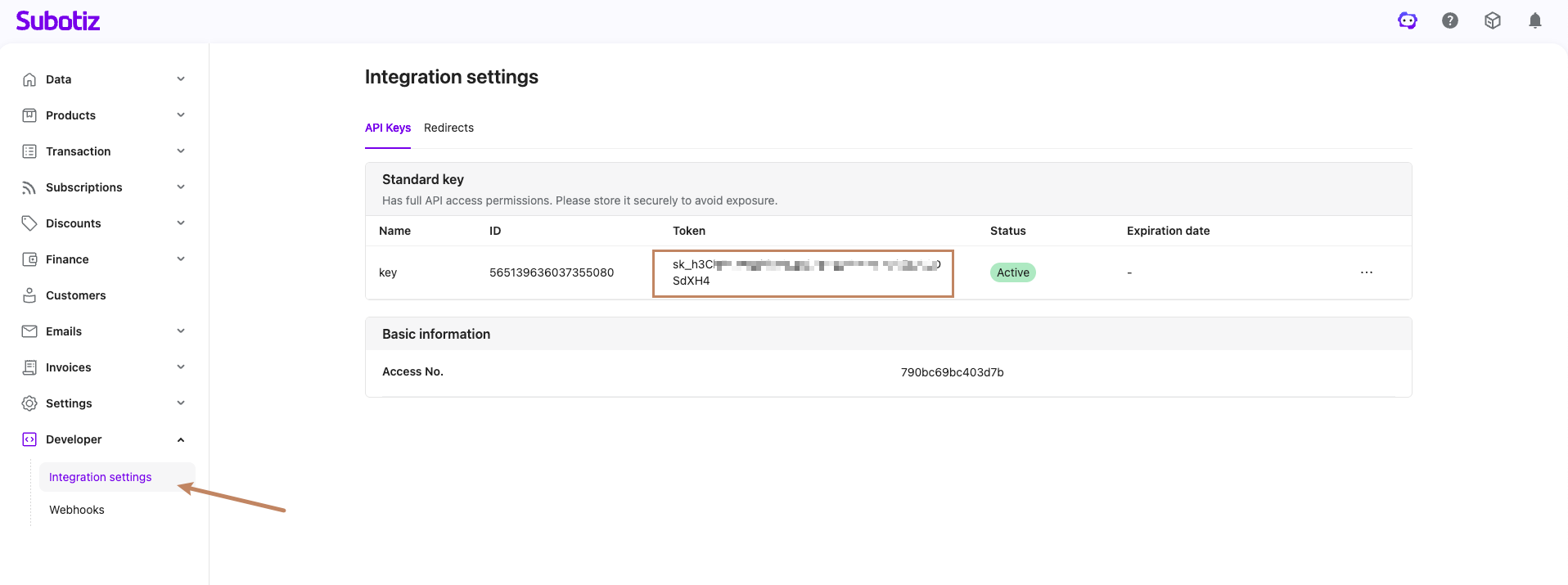
Making Authenticated Requests
Request Header Format
All OpenAPI requests must include the following HTTP header:
| Header | Value | Description |
|---|---|---|
Authorization | Bearer {your_api_key} | Replace {your_api_key} with your actual API Key |
Example
curl -X GET "https://api.subotiz.com/openapi/v1/orders" \
  -H "Authorization: Bearer {your_api_key}"
Key Rotation
When a key is compromised or needs periodic renewal, you can rotate it from the Developer Settings page.
Rotation Process
- Initiate key rotation in Developer Settings — a new API Key will be generated
- The system sets a grace period for the old key (default: 3 minutes, customizable at rotation time)
- During the grace period, both old and new keys are valid — update your services to use the new key as soon as possible
- After the grace period ends, the old key is automatically invalidated; only the new key remains valid
Note: Complete the switch to the new key before the grace period ends to avoid request interruptions. If you have Webhooks configured, key rotation also affects Webhook signature verification — it is recommended to support both old and new keys for signature validation during the grace period. See Webhook Introduction for details.
Error Handling
When authentication fails, the API returns an HTTP 401 status code. The following table lists common error causes and recommended actions:
| Error Cause | What to Do |
|---|---|
Missing Authorization header | Ensure your request includes Authorization: Bearer {key} |
| Invalid or non-existent API Key | Verify the key is correct, or retrieve it again from the dashboard |
| API Key expired or revoked | Generate a new key from Developer Settings |
Malformed Authorization header | Ensure the format is Bearer {key} with exactly one space after Bearer |
Error response example:
{
  "code": "unauthorizedError",
  "message": "ApiKey authentication is required"
}